

Google Workspace and Microsoft 365 are standard in education, but they are built for adults.
When you put corporate software in front of a Key Stage 1 class, you spend more time managing the interface than teaching the curriculum. Drop-down menus, complex file structures, and complicated 'save' processes are barriers to young learners.
"Microsoft and Google were built for the boardroom. Just2easy was built for the classroom.
We compare the 'big' platforms with J2e to show why a purpose-built primary solution makes all the difference."
How can J2e support a Primary-Specific Computing Platform?
✔️ Solving the Login Problem
Password management is one of the biggest barriers to teaching primary computing. It is a shared frustration across the sector:
We’ve all been there: a 40-minute computing lesson where 20 minutes are spent helping 30 children type a password. J2e solves the 'login bottleneck' with smart, primary-focused solutions.
J2e fixes this practically. For Early Years and KS1, there are other login options:
- Pupils just hold a printed QR code (stuck in their reading diary or on a lanyard) up to the device camera. They are logged into their personal dashboard in seconds. No typing, no spelling mistakes, and (most importantly) no teacher intervention needed.
- For KS2, where typing skills are better, the platform integrates directly with your existing Microsoft or Google Single Sign-On (SSO). You do not have to manage or provision a separate set of passwords. As children move up to Key Stage 2, they shouldn't have to juggle a dozen different passwords for different apps.
- J2e links directly to your school’s Google or Microsoft accounts. So, if they can log into their school email, they’re already logged into J2e. Teachers never have to manage a separate list of passwords again.
You get those 20 minutes back. That’s more time for coding, creating, and exploring, and a lot less stress for you.
.png?width=700&height=394&name=Untitled%20(18).png)
✔️ Accessible Tools for Early Years
Teaching digital skills to a 4-year-old requires software without hidden settings. The Just2easy Infant Tools (JIT) are built specifically for EYFS and KS1.
In practice, this means a Reception pupil can open 'JIT Paint', use a large, colour-coded interface to draw a picture, and click a single, prominent 'Save' button. The file is automatically saved directly into their personal folder. There is no "Save As" dialogue box or folder navigation required
By removing complex menus and difficult navigation, JIT allows children to focus on what matters: exploring the curriculum and creativity. Whether they are using the 'Turtle' to learn directions or 'Write' to practice their first sentences, JIT provides a safe, secure, and supportive start.
A child’s creativity is limitless, but not their patience for a "File > Save As" menu!
This is where Just2easy Infant Tools (JIT) is ideal as a whole classroom tool, as it removes the "boring bits" of computing so children can focus on the task and their creativity.
In JIT Paint, there is one big, bright Save button. With one click, the work is automatically saved in their personal folder.
JIT also uses a large, colour-coded interface. There are no hidden settings or confusing pop-up boxes. It’s designed for developing fine motor skills, allowing pupils to:
- Pick a tool by colour.
- Create without getting stuck in menus.
- Succeed independently.
Therefore, as a teacher, you can stop being a "troubleshooter" and start being an educator. Instead of running around clicking "OK" on thirty different screens, you can spend that time talking to your pupils about what they’ve created.
By simplifying the interface, we aren't "dumbing down" tech—we’re empowering the next generation to master it.
✔️Consistent Curriculum Progression, especially in Coding and data handling
For Computing Leads, ensuring a consistent and progressive teaching approach across year groups is a priority. This is particularly crucial in areas where staff confidence has historically been lower, such as coding and data handling.
The common problem facing leads is the "patchwork curriculum," where different year groups use disparate, unconnected tools (or avoid complex topics entirely due to a lack of confidence), leading to significant gaps in student knowledge.
The J2Launch platform is designed precisely to solve this problem by providing a centralised, single point of access.
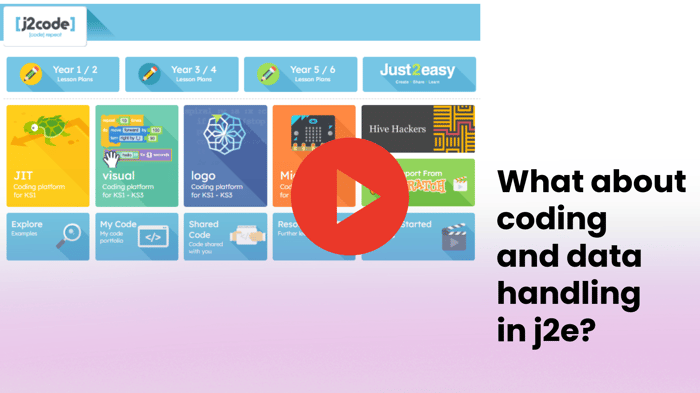
The J2Code tool provides a clear stepping-stone approach to computational thinking. Computing Leads no longer need to source different software for different age groups; the progression is built in:
-
Foundation/KS1 (Turtle): Pupils start with 'Turtle', focusing on basic directional algorithms.
-
Lower KS2 (Visual): Students smoothly transition to 'Visual', a block-based coding environment similar to Scratch, introducing key concepts like loops and variables without the barrier of complex syntax.
-
Upper KS2 (Logo): By the time they reach Upper KS2, students are ready to progress to 'Logo' (text-based coding), preparing them for secondary school computer science.
Furthermore, J2e provides the essential framework that makes this progression actionable: complete progression maps and comprehensive lesson plans. Teachers do not need to plan these lessons from scratch; they can simply sign in via the portal shown and follow the mapped resources.
This provides the crucial "scaffolding" required to build staff confidence and guarantees that data handling and coding are taught effectively across the entire school.
Do you want to find out more?
Discover our new training sessions, 'Legends of Learning'
'We are not the legends you are!'
Our first session in the series puts a spotlight on Just2easy and how schools are using it to transform digital skills and more in EYFS and Key Stages 1 & 2, and is being held on April 21st 5 pm - 7 pm
✔️ Hear from "Learning Legends" classroom practitioners on how they integrated the J2E toolsuite into their weekly planning.
✔️ Platform Updates: Get the latest updates from the J2E team.
✔️ Networking & Pizza: An opportunity to connect with educators to swap digital strategy tips in a low-pressure social setting.
This is an in-person evening event held at LGfL HQ To keep the atmosphere intimate and conversational, places are strictly limited to 30 delegates. Pizza (including GF/Vegan options) and refreshments (beer/wine/soft drinks) will be provided.
Target Audience: Computing Leads, Digital Strategy Leads, EYFS & Primary Teachers

Remember also our LGfL Learning Consultants are here to help.
Book a free training session to help inspire your staff and discover how to integrate J2e effectively across the entire primary curriculum.
Get started today at contentsupport.lgfl.net/